
AppClose: Co-Parent Essentials
AppClose, IncParenting
4.31.94K Reviews
- Version
- 3.4.7.8
- Installs
- 1.00M
- Age Rating
- Everyone
Screenshots
Our Review of AppClose: Co-Parent Essentials
 Analysis by Appyee
For co-parents, a missed message or a muddled handover can turn a small scheduling change into a stressful day. I find that AppClose: Co-Parent Essentials is most useful when both adults are willing to keep practical details in one shared place: conversations, calendar plans, and child-related expenses. It is a parenting app from AppClose, Inc, and its focus is narrower than a general family organizer. That focus can be a real help when coordination needs to stay clear, but it also means the app works best as a shared routine rather than a tool one parent can use alone to manage everything.
When a connection is part of the plan
Many of the app’s most useful moments involve information moving between two people. A message about a pickup time, a change to an appointment, or a note about an expense only helps the other parent once it reaches them. I would treat the app as a place to communicate and organize, not as a guarantee that someone has seen a time-sensitive update. For an urgent change, I’d use whatever direct contact method both parents already rely on, then keep the fuller context in the shared conversation.
That distinction matters because co-parenting plans often change while someone is commuting, working, or managing a child’s immediate needs. A calendar entry can make the plan easier to refer back to, but it does not replace confirming a last-minute handoff. My practical tip is to put stable arrangements and useful context in the app, while making direct confirmation part of the routine whenever timing is tight. This avoids expecting a shared calendar or message history to act like a live conversation.
Designed for the phone, but not every moment
AppClose makes the most sense when each parent can check a phone as part of an ordinary day. A quick look can help someone confirm an appointment or review a schedule without digging through old texts. It is also a natural place to record a cost close to when it happens, while the receipt or reason is still easy to remember. Those small habits can reduce the end-of-month detective work that often comes with shared child expenses.
There is a trade-off: keeping a shared record current takes attention from both people. If one parent enters changes and expenses consistently while the other rarely checks in, the app may become a one-sided log rather than a reliable coordination tool. I’d agree on a simple convention before depending on it—for example, which parent adds an event, how changes are confirmed, and when an expense gets recorded. That conversation can be more valuable than adding every possible detail to the calendar.
Recovery, boundaries, and practical expectations
Any app-based routine can be interrupted by a dead battery, a poor connection, or a phone that is not close at hand. I would not make a critical exchange depend on being able to open an app at exactly the right moment. Keep essential contact details accessible in the way that works for your family, and use a direct call or message when a child’s immediate safety or a same-day handoff needs attention. Then, once both parents can check the shared space, record the change there so the ongoing plan remains understandable.
Shared records also call for restraint. It can be tempting to document every disagreement, but a useful co-parenting space should make decisions easier to find, not turn each exchange into a running argument. I’d keep entries factual: the date, the change, the expense, or the action needed. That makes a message thread or calendar more useful later and lowers the chance that practical coordination gets buried beneath emotional commentary.
Who gets the most from a shared system
This app is a stronger fit for parents who need repeatable coordination across separate households: recurring custody arrangements, school or medical appointments, and costs that need to be tracked between adults. It may also help when conversations tend to get scattered across texts and email, because having a central place can make the relevant history easier to revisit. The key condition is cooperation. Both parents need to be able to participate, agree on what belongs there, and check the shared information often enough for it to stay useful.
If your co-parent already communicates reliably and there are few schedule changes or shared expenses, a basic calendar and ordinary messaging may be simpler. Likewise, if one parent will not use a shared app, installing it does not solve the underlying coordination problem. I would not recommend relying on it as a substitute for legal advice, urgent contact, or a direct conversation about a serious disagreement. It is an organizer for everyday co-parenting tasks, not a way to make both people agree.
A realistic handoff and expense routine
Imagine a school-day pickup changes because an appointment has moved. One parent can add the updated plan to the calendar and send a message that explains what changed; the other can check the details before leaving. If a related cost comes up, recording it near the event can keep the amount and reason connected instead of leaving both parents to reconstruct it later from receipts and memory. This is a modest workflow, but it is exactly where a shared record can save effort—provided both parents confirm changes that cannot wait for a routine check-in.
For expenses, I’d avoid treating an entry as proof that the other person has understood or agreed to it. Use a clear description and keep whatever supporting information your own household needs, then discuss disputed or unusual costs directly. The useful insight is to separate record-keeping from agreement: the app can help preserve what was entered, while the parents still have to settle questions about responsibility or timing.
How it compares with familiar alternatives
Compared with a shared phone calendar, AppClose brings communication and expense organization into the same co-parenting context rather than leaving those details split between separate tools. Compared with ordinary text messages, a dedicated shared space can make schedules and past conversations easier to distinguish from unrelated chats. That is helpful when you need to find a particular handoff detail later, but it adds a new habit: both adults have to remember where the current version of the plan lives.
A spreadsheet or a shared document can be enough for parents who mainly need an expense ledger and rarely adjust schedules. Standard messaging may be the better choice for two people who already communicate well and do not need a separate record. I’d choose this app when the combination of calendar coordination, messages, and expense tracking addresses a real recurring problem—not simply because another app seems like it ought to make co-parenting easier.
Cost, age suitability, and choosing carefully
The app is free to download and use, and it is rated for everyone. Its average rating is 4.6 from around 28,000 ratings, with roughly 1,700 written reviews and over a million installs. The current version is 3.4.6, and it runs on Android 5.0 or later; it is also available for iOS. There are in-app purchases ranging from $8.99 to $98.99 per item, so I would check the purchase details in the app before assuming every optional item is included at no cost. The free starting point is useful, but “free” should not be read as meaning that no paid items are offered.
Because the app concerns family schedules and conversations, I’d also be deliberate about who is invited and what information is entered. The published description emphasizes encrypted data and access for invited people, but good habits still matter: use appropriate device security, avoid putting unnecessary sensitive details into shared notes, and review access when family circumstances change. An app can support boundaries, but parents have to decide what information is appropriate to share and keep current.
Getting Started with AppClose
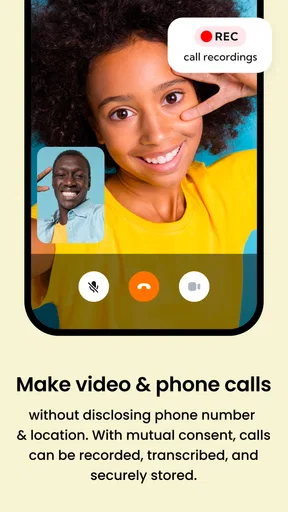
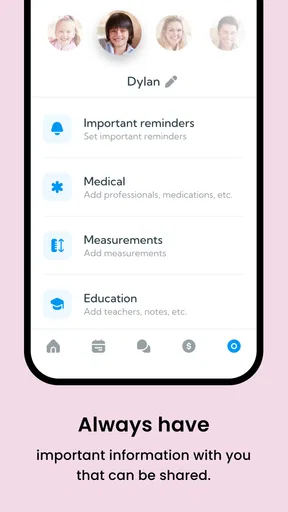
First off, setting up AppClose is a breeze. Just download it from your trusty app store, and you’re good to go. It’s available on both Android and iOS, so no worries about compatibility here. Once you’ve got it installed, the user-friendly interface guides you through the initial setup. You can easily add family members, set up custody schedules, and even manage expenses. It’s like having a personal assistant dedicated to co-parenting!
Simplifying Communication
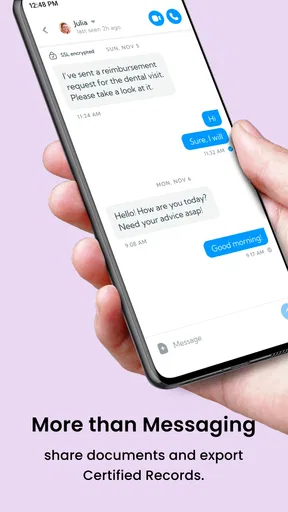
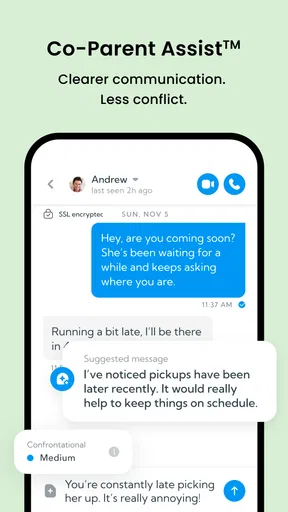
Let’s be real, co-parenting requires a solid communication strategy. With the app’s messaging feature, you can keep all conversations in one place. It even timestamps messages, so there’s no more “he said, she said” drama. This can be a game-changer for reducing misunderstandings and keeping everyone on the same page.
Organizing Schedules and Expenses
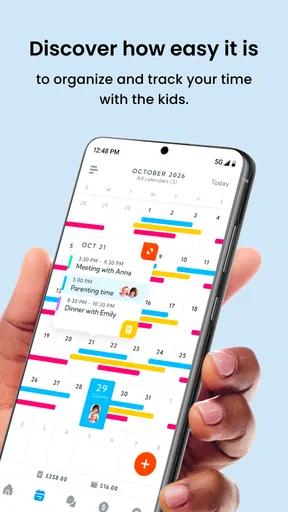
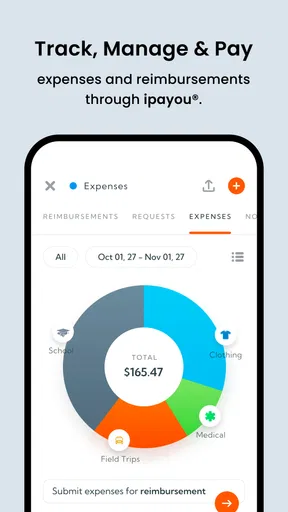
One of my favorite features is the calendar. You can easily track custody schedules, appointments, and even add recurring events. It sends reminders, so you never miss a beat. Plus, the expense tracker is super handy. Whether it's splitting costs for school supplies or doctor visits, you can manage everything right within the app. No more scrambling through old text messages or emails to find who owes what.
Privacy and Security
In a world where privacy is paramount, AppClose takes it seriously. All data is encrypted, giving you the peace of mind that your personal information is secure. Only the people you invite can access your shared information, so you’re always in control of who sees what.
Free to Use
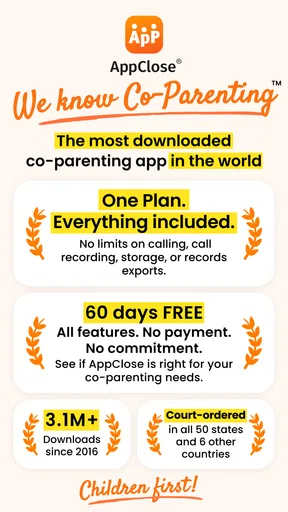
Yes, you read that right! AppClose doesn’t charge any subscription fees. It’s completely free, which is a huge plus when you’re already managing the financial aspects of co-parenting. There are no surprise costs, making it accessible for everyone.
To wrap it up, AppClose: Co-Parent Essentials really lives up to its name. It streamlines the co-parenting process, making life a little bit easier for everyone involved. Whether it's keeping track of schedules, managing expenses, or ensuring clear communication, this app has got you covered. So why not give it a whirl? You might just find it’s the app you’ve been waiting for.
My connectivity verdict
I see this as a practical shared workspace, not a magic fix for tense communication or a replacement for direct contact. Its value depends on both parents being able to reach the app, checking it regularly, and agreeing to keep the calendar and records in step with real life. Network-dependent exchanges are most useful for planned coordination; for a time-critical change, confirm it directly and update the shared record afterward.
If you and your co-parent want one place for messages, custody plans, appointments, and expenses, this is worth considering. If reliable access or mutual participation is unlikely, a simpler method you both already use may be more dependable. That is the choice I would make: start with the smallest routine that solves a real problem, see whether both adults maintain it, and keep urgent communication separate from the record-keeping.
Privacy and Permissions
See what permissions an app requests and how it handles your data.
- Calendar
- read calendar events plus confidential information
- Contacts
- read your contacts
- Location
- approximate location (network-based), precise location (GPS and network-based)
- Photos/Media/Files
- read the contents of your USB storage, modify or delete the contents of your USB storage
- Storage
- read the contents of your USB storage, modify or delete the contents of your USB storage
- Camera
- take pictures and videos
- Microphone
- record audio
- Wi-Fi connection information
- view Wi-Fi connections
- Other
- view network connections, pair with Bluetooth devices, access Bluetooth settings, change network connectivity, disable your screen lock, full network access, change your audio settings, run at startup, control vibration, prevent device from sleeping
Verdict
Strengths of AppClose: Co-Parent Essentials
- Intuitive interface simplifies co-parenting.
- Customizable calendar for shared events.
- Secure messaging keeps communication private.
- Expense tracking aids financial transparency.
- Free to use without in-app purchases.
Limitations of AppClose: Co-Parent Essentials
- Limited integration with external calendars.
- No desktop version available yet.
- Notifications can be overwhelming at times.
- Requires stable internet connection.
- Limited customer support response time.
Similar Picks in This Category
View All
Family Space
Motorola Mobility LLC.3.9

شرطة الأطفال - مكالمة وهمية
Oub Apps4.1

Findmykids: Parental Control
LETEM LTD4.6

Pregnancy + | Tracker App
Philips Electronics UK Limited4.8

Policía de niños - para padres
Kids police4.7

Pregnancy App
Amila4.9
Frequently Asked Questions
What is AppClose, and how does it assist with co-parenting?
AppClose is a comprehensive co-parenting app designed to streamline communication and organization between co-parents. It offers features like shared calendars, expense tracking, and secure messaging to ensure both parties can coordinate effectively. By centralizing co-parenting tasks, AppClose helps reduce misunderstandings and conflicts, making the shared parenting experience smoother.
Is AppClose free to use, and are there any in-app purchases?
Yes, AppClose is free to download and use. Unlike many co-parenting apps, it offers its core features at no cost. While it provides a comprehensive suite of tools without requiring in-app purchases, it's always good to review the app’s terms and conditions for any potential changes regarding premium features or future updates.
How secure is the information shared on AppClose?
AppClose places a strong emphasis on security and privacy. It uses encryption to protect user data and secure messaging to ensure that communication between co-parents remains confidential. Users can rest assured that their personal information and shared details are safeguarded against unauthorized access.
Can AppClose be used for managing more than just co-parenting tasks?
Yes, while AppClose is primarily designed for co-parenting, its versatile features can be adapted for other collaborative uses. For instance, its calendar and expense tracking can be useful for managing schedules and finances in other family or group dynamics, making it a flexible tool for various organizational needs.
Does AppClose offer any support or resources for new users?
AppClose provides a range of support resources for new users, including tutorials and a help center to guide them through using the app’s features. Additionally, they offer customer support for any technical issues or questions, ensuring that users can fully leverage the app’s capabilities from the start.
